
Mind mapping is one of the most powerful study techniques available today. Whether you’re preparing for competitive exams like JEE, NEET, UPSC, or CAT — or simply trying to organize notes for your university coursework — a good mind map tool can dramatically improve how you retain and connect information. This guide covers the best mind map software for students in 2026, with honest assessments of pricing, free tiers, offline access, and overall usability.
What Is a Mind Map and Why Should Students Use It?
A mind map is a visual representation of ideas branching out from a central topic — much like how our brain naturally processes information. Instead of linear notes, you see connections at a glance.
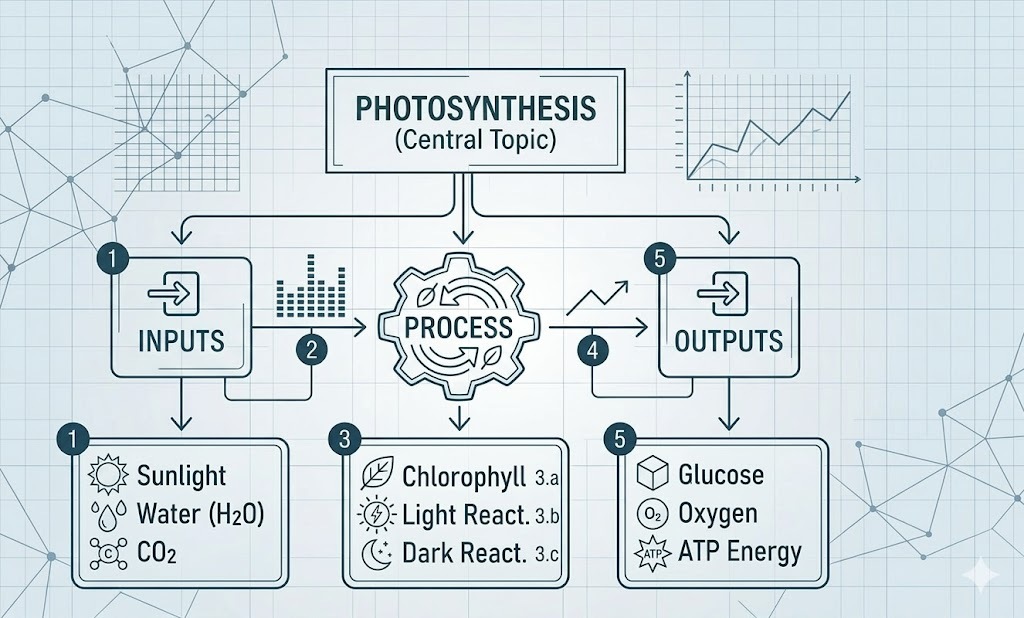
Figure 1: A sample mind map on Photosynthesis — the kind you can build in any tool on this list.
Studies in educational psychology show that visual organization helps students recall information more effectively during exams. In a country where competitive exam syllabi like UPSC, JEE, and NEET are famously vast, mind maps are especially practical for quick revision, essay writing, and concept connection.
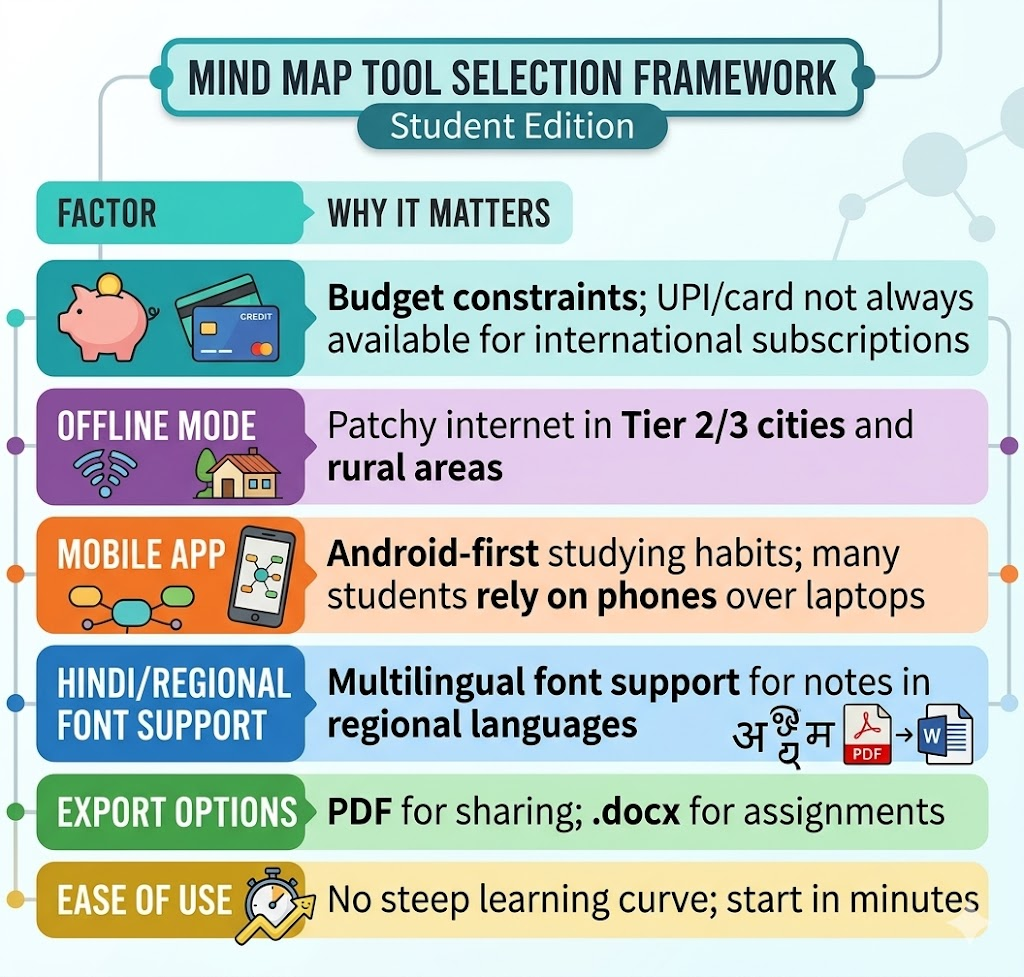
Factors to Consider
Before diving into the list, here’s a quick framework for choosing the right tool:
The 7 Best Mind Map Tools for Students (2026)
1. XMind — Best Overall
Website: xmind.com
XMind is arguably the most popular mind mapping tool globally, and it holds up exceptionally well for students at every level. It offers a robust free plan with essential features, and an Education Plan starting at just $3.42/month (~₹285/month) — with a massive 60% discount for verified students and educators.
Key Features:
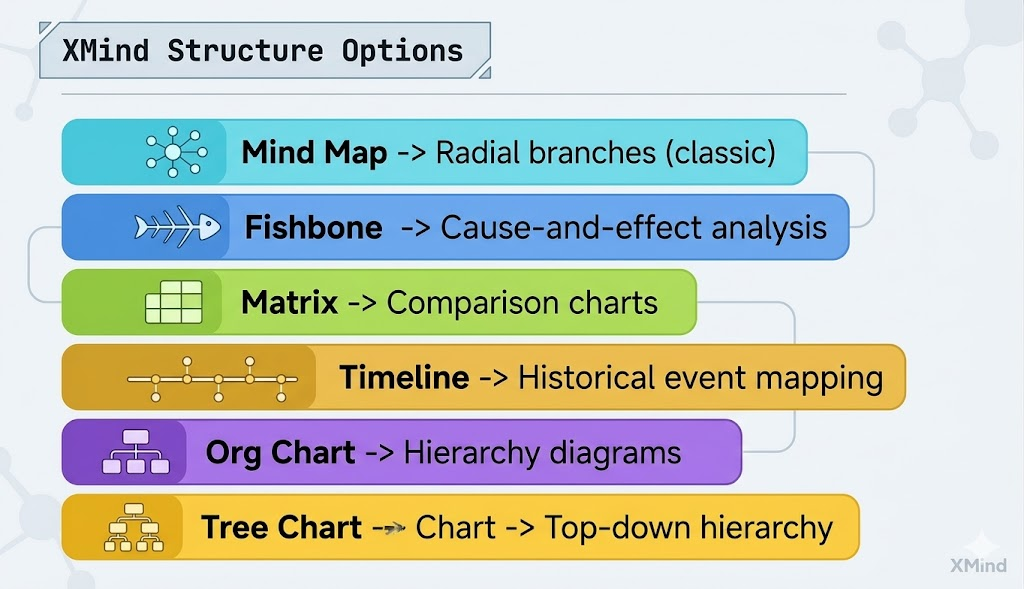
- Supports multiple map structures: mind maps, fishbone diagrams, timelines, org charts, and matrices
- Works on Windows, macOS, Linux, iOS, and Android
- Offline mode available — perfect for areas with inconsistent internet
- AI-powered idea generation and auto-map creation (Premium plan)
- Export to PNG, SVG, PDF, Markdown, Word, and Excel
- AES-256 encryption for data security
Free Plan Limitations: Limited to basic features without cloud sync or AI tools. Sufficient for most student use cases.
Best for: JEE/NEET concept mapping, project planning, essay outlining.
2. Coggle — Best Free Option for Collaboration
Website: coggle.it
Coggle is a browser-based tool that requires no download, making it ideal for students using school computer labs or shared devices. Its free plan is genuinely generous.
Key Features:
- Real-time collaboration — multiple students can edit simultaneously
- Supports multiple starting points in one map (unique feature)
- Version history so you can track every edit
- Unlimited image uploads on all plans
- Integrates with Google Drive for cloud backup
- Clean, distraction-free interface
Free Plan: 3 private diagrams, unlimited public diagrams — great for most student needs.
Paid Plan: ~$5/month for unlimited private diagrams.
Best for: Group project brainstorming, study groups, shared revision notes.
3. MindMeister — Best for Visual Presentations
Website: mindmeister.com
MindMeister is a cloud-based tool praised for its beautiful, presentation-ready mind maps. It integrates tightly with tools like Google Drive, Slack, and Trello, and includes a Presentation Mode that lets you convert maps into slides — useful for seminars and viva sessions.
Key Features:
- Real-time collaboration with live cursors
- Presentation Mode (turn maps into slide decks instantly)
- Google Drive and Trello integrations
- Color-coded themes and custom icons
- Task assignment and due dates within maps
Free Plan: 3 mind maps — quite limited. Paid plans start at ~$5.49/month.
Best for: College presentations, group thesis planning, project management.
4. Mindomo — Best for Education-Focused Features
Website: mindomo.com
Mindomo has built a strong reputation specifically in the education sector. Its education-first design philosophy means teachers and students get purpose-built templates that fit academic workflows right out of the box.
Key Features:
- Education-specific templates for lesson plans and study guides
- Clean context menus (only shows relevant options when you click)
- Add audio, video, and hyperlinks to mind map nodes
- Presentation Mode for interactive slide creation
- Exports to PDF, DOCX, PPTX, PNG, HTML, and more
- Collaboration features for classroom use
Free Plan: 3 mind maps with limited features.
Education Discount: Available for verified students and teachers.
Best for: School projects, teacher-created revision resources, multimedia learning.
5. Miro — Best Digital Whiteboard + Mind Map Combo
Website: miro.com
Miro is more than a mind map tool — it is a full digital whiteboard platform. If you want to combine mind maps with sticky notes, diagrams, flowcharts, and drawings in one place, Miro is unbeatable. However, its sheer breadth of features can feel overwhelming for beginners.
Key Features:
- AI-powered mind map generation (Miro Assist)
- Sticky notes, diagrams, and freehand drawing alongside maps
- Widely used by engineering, design, and MBA students
- Excellent for ideation workshops and hackathons
- Real-time collaboration for large teams
Free Plan: 3 editable boards — enough to get started.
Best for: Design students, MBA students, engineering project brainstorming.
6. FreeMind — Best Completely Free & Offline Tool
Website: freemind.sourceforge.net
For students on a zero budget who need offline functionality, FreeMind is an open-source, completely free solution. It runs entirely on your PC without internet and has no paywalls whatsoever.
Key Features:
- 100% free, forever — no subscriptions
- Works fully offline
- Available on Windows, macOS, and Linux
- Lightweight and fast even on older hardware
- Good for students with low-spec laptops
Drawbacks: The interface is dated and lacks the polish of modern tools. No mobile app, no real-time collaboration, no AI features.
Best for: Students on a tight budget, areas with no reliable internet, basic note organization.
7. Mapify — Best AI-Powered Tool for Study Summaries
Website: mapify.so
Mapify is an emerging AI mind mapping tool that converts YouTube videos, PDFs, documents, and long emails into structured mind maps automatically. For students who learn from YouTube lectures, NCERT PDFs, or dense coaching material, this is a genuine game-changer.
Key Features:
- Upload a PDF or paste a YouTube link → get an instant mind map
- One-click mind map generation from any content
- Supports PDFs, videos, audio files, and images
- Customizable with AI assistance
- Easy export and sharing
Best for: UPSC aspirants (processing dense reading material), engineering students, anyone who learns primarily from video lectures. Website: mapify.so
Mapify is an emerging AI mind mapping tool that converts YouTube videos, PDFs, documents, and long emails into structured mind maps automatically. For Indian students who study from YouTube lectures, NCERT PDFs, or coaching material, this is a genuine game-changer.
Key Features:
- Upload a PDF or paste a YouTube link → get an instant mind map
- One-click mind map generation from any content
- Supports PDFs, videos, audio files, and images
- Customizable with AI assistance
- Easy export and sharing
Best for: UPSC aspirants (reading dense material), engineering students, anyone who learns from video lectures.
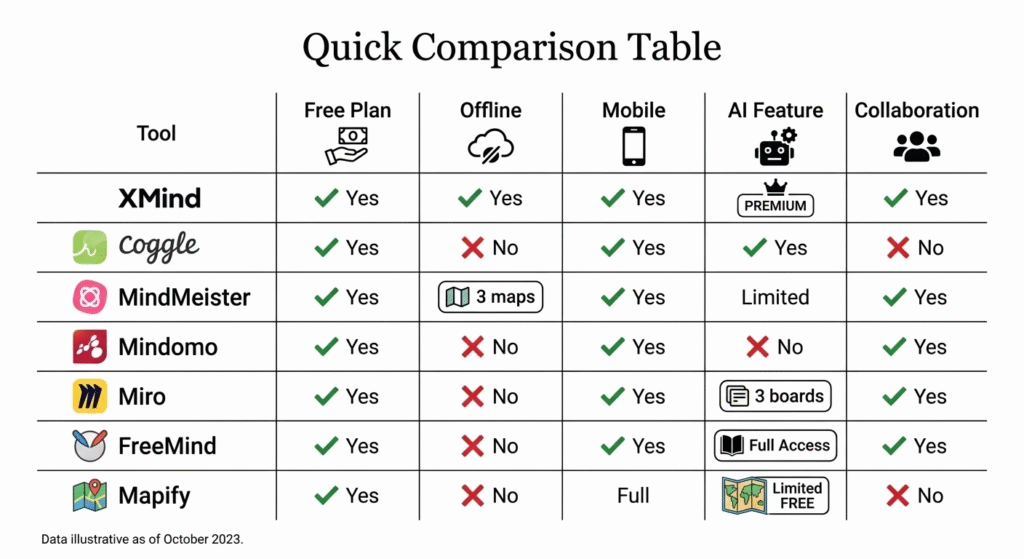
Quick Comparison Table
Practical Use Cases
UPSC Preparation: A civil services aspirant can use XMind to map the entire Indian Polity chapter — Articles, Amendments, Fundamental Rights — all branching from a central node. The timeline view is ideal for History mapping.
JEE/NEET: Chemistry students can use Coggle or XMind to create reaction mechanism maps, connecting reagents, conditions, and products visually — making organic chemistry much less intimidating.
Engineering Students: Use Miro for system design brainstorming in groups, or Mapify to auto-summarize lengthy research papers before your viva.
MBA Students: MindMeister’s Presentation Mode is excellent for converting business strategy maps directly into boardroom-ready slides.
Tips for Getting the Most Out of Mind Mapping
- Start with one central idea — don’t try to map everything at once.
- Use colors — assign one color per main branch (e.g., blue = Input, red = Process, green = Output).
- Keep node text short — 1–4 words per node; elaborate in child nodes.
- Revisit and prune — a good mind map grows over time as your understanding deepens.
- Use images and icons — research shows that visual cues significantly improve memory recall.
Conclusion
XMind is the best all-round choice for students in 2026. Its free plan is genuinely functional, its offline mode works beautifully in low-connectivity environments across Tier 2 and Tier 3 cities, and the 60% education discount makes the paid plan very accessible at ~₹285/month. For those who study from YouTube lectures or NCERT PDFs, pairing it with Mapify for AI-powered summaries is a powerful combination. And if budget is the absolute priority, FreeMind gets the job done without asking for a single rupee.
Mind mapping is not just a trend — it is a proven technique that aligns with how the human brain organizes information. Investing time in a good mind map tool is one of the best academic decisions you can make.
Useful Links
- XMind Free Download — Available on Windows, Mac, Linux, iOS, Android
- XMind Education Discount (60% off) — Verify with student ID
- Coggle — Free Mind Mapping in Browser
- MindMeister
- Mindomo for Education
- Miro Free Whiteboard
- Mapify AI Mind Maps
- FreeMind Open Source
Published on behalf of educators and students navigating the vast landscape of EdTech tools available in India. Always verify pricing directly on vendor websites before purchasing, as plans may change.